
Cricket ID Login — Open the Sign-In Address, Enter the Case-Sensitive Password and Bet Secure
Paste, type, type, tap: that is cricket ID login on any exchange from Online Cricket ID. The address goes into Chrome or Safari, the username goes in exactly as sent, the password follows with its capitals intact, and sign in finishes it. All three details reach your Online Cricket ID chat about two minutes after a deposit clears, and a lost password is reset in minutes.
Cricket ID Login Fields: Where the Username and Password Go, Fast
Nothing to install: the sign-in lives on the exchange web page itself. You reach it through the address in your Online Cricket ID WhatsApp chat, and the page asks for two things in order, the username first and the password second, before one press on sign in opens your wallet.
- Copy the address from the chat. Tap the link the desk sent, or paste it into Chrome or Safari. An address saved weeks ago may already be blocked.
- Username box. Compare it with the chat once more before moving on. One extra space, invisible on a phone keyboard, and the exchange says the user does not exist.
- Password box. Keep the exact capitals from the chat, because every Online Cricket ID password is case-sensitive. Small where it should be big means a refusal, again and again.
- Sign in. Watch for a second, demo-login button on some exchanges. It leads to a practice view with no wallet, so tap the real sign-in.
Holding Lotus365 and Diamond Exchange? Then you hold two usernames, two passwords and two balances, since Online Cricket ID issues every login for a single exchange and nothing carries across. Type the Lotus365 username on Diamond Exchange and it bounces. One account per exchange, whichever ones you pick from Online Cricket ID.
The demo-login route shows markets but no balance, so a missing wallet after sign-in usually means the wrong button.
First Online Cricket ID Login: Set a Secure Password of Your Own
Before the first bet, spend a minute in the exchange account menu. The starter password Online Cricket ID sent is still sitting in WhatsApp, where anyone picking up your open phone could scroll up and read it, so a safe first sign-in ends with a password only you know.
Some exchanges on the Online Cricket ID rack force the issue, dropping you onto a change-password scren at the first sign-in. On others nothing pops up and you open the account menu yourself. It is the last of six steps to an ID. Under a minute.
A password that holds up
- Long, with letters, digits and at least one capital
- Used nowhere else, not your UPI app and not your email
- Nothing anyone could guess from your WhatsApp profile
A password that causes trouble
- Your mobile number or date of birth
- The Online Cricket ID starter from the chat, left unchanged
- Something you will forget by Sunday
Keep the new Online Cricket ID password on paper or in a password manager, somewhere a match-night memory lapse cannot reach. Late changes are the classic trap. A password picked in a hurry during the 18th over tends to vanish by the next afternoon, and while the desk will happily reissue one, that still means a few minutes outside the market you wanted.
Changed it at the toss, felt clever. By the second innings I had no idea what I typed. One message to the desk and I was back in before the over finished.
Cricket ID Login Errors and the Quick Fix for Each
Refused at sign-in? Match the message the exchange shows against the table below. Capitals, a stray space, a dead bookmark and a username meant for another exchange account for almost every Online Cricket ID case, and each fix takes a minute or less.
| What you see | Likely cause | What to do |
|---|---|---|
| Invalid username or password | Caps lock on, or a capital typed small | Retype the password slowly; it is case-sensitive |
| User not found | A space copied with the ID, or a letter swapped | Paste the ID into notes first, trim it, then copy again |
| User not found, ID is correct | The ID belongs to a different exchange | Open the exchange named in your Online Cricket ID chat |
| Page fails to open or times out | Bookmark of a blocked address | Ask the desk for the current address |
| Old password still filled in | Browser autofill saved the starter | Clear the saved entry and type the new one |
| Nothing works after three tries | Password forgotten or mistyped at the change | Request a reset on WhatsApp |
Online Cricket ID players should run the first two rows before anything else. They cost ten seconds each.
Still locked out after those checks? Screenshot whatever message the exchange shows and send it to the Online Cricket ID desk with the exchange name attached, because that one picture usually settles on sight whether the fix is a fresh address, a reset or simply the right site for that username. The thread runs 24x7. A failure at 2 a.m. gets the same handling as one at lunch.
Online Cricket ID Password Reset: Back In Within Minutes, Same Username
Invalid password on the third try means it is time for a reset, and that costs one message. Put the exchange name on one line and your username on the next, send it to Online Cricket ID, and a fresh password is back in that thread within minutes. Same username afterwards; open bets keep running.
What to send for a reset
- Exchange name: Sky Exchange, FairPlay, Lotus365 or whichever one you play on
- Your username: copied straight from the chat, so the Online Cricket ID desk sees the spelling it issued
- The number you write from: the same WhatsApp number that opened the ID
Three details, nothing more. The reply to a reset is a password and only a password; no code, PIN or card number ever enters the exchange, so a chat asking for one is someone else. Before you need it, save the contact with the steps on the online cricket id whatsapp number for resets page; then a reset message cannot go astray.
Same drill as day one after a reset: sign in with the fresh Online Cricket ID password, open the account menu, swap it for one you chose. Repetitive, yes. A minute well spent.
After the reset you land back on the exchange home screen, and the markets you were following, from match odds to session runs to the live roulette table, sit right where you left them.


Stay Signed In With an Easy Cricket ID Login Shortcut on the Phone
The simplest way to keep your Online Cricket ID login one tap away is a home-screen icon for the exchange address. It opens the live site, so there is nothing to update, and it takes almost no storage.
- Android phone
- Sign in before anything else so the shortcut lands on your account. After that, Chrome hides Add to Home screen behind its three dots.
- iPhone
- Safari only for this one: the Share sheet holds Add to Home Screen, and the icon keeps your Online Cricket ID session.
- Laptop
- A bookmark does the same job; swap it the day the desk sends a new address.
A shortcut beats hunting for a store listing, since the Indian Play Store has no real-money betting apps to offer anyway. Where an exchange does publish an Android file, the Online Cricket ID chat is the one place to fetch it; forwarded links from strangers stay unopened. Either route ends at the same sign-in screen. The cricket betting app page for phones covers the rest.
Blocked address, dead icon. The shortcut points at a single Online Cricket ID address, so the day that address gets blocked you delete the icon and pin the new one. Saving you username in the browser is fine on a phone nobody else touches; on a shared laptop sign out every time, and if you slip once, ask Online Cricket ID for a password reset.
Login Page Not Loading? Get the Official Online Cricket ID Address
Your account is fine; the address is what broke. Indian networks block betting domains from time to time, and the Online Cricket ID desk sends whichever address works today. Sign in there with the details you already have, and the balance is waiting.
A blocked Online Cricket ID exchange domain often shows as a page that spins forever, a browser warning, or an unrelated screen. Hard to say which one you will get. All of them mean the same thing, and none of them mean your account is gone.
- Write one line in the Online Cricket ID chat: which exchange, and that the old link is dead
- Tap the fresh link the desk sends and type the same Online Cricket ID username and password as before
- Replace your bookmark and home-screen icon with the new Online Cricket ID address
The busiest exchanges get blocked most. A worked case sits on the sky exchange cricket id address swap page: an old link swapped for a new one while the Online Cricket ID username stayed the same. Nothing to sign in to yet, because you have no account? Start at get cricket id from the desk; a ₹100 deposit there brings your Online Cricket ID username and password in about two minutes.
Sign in only at 18+ and only where it is allowed: rules differ and have tightened, so read the law for your state.
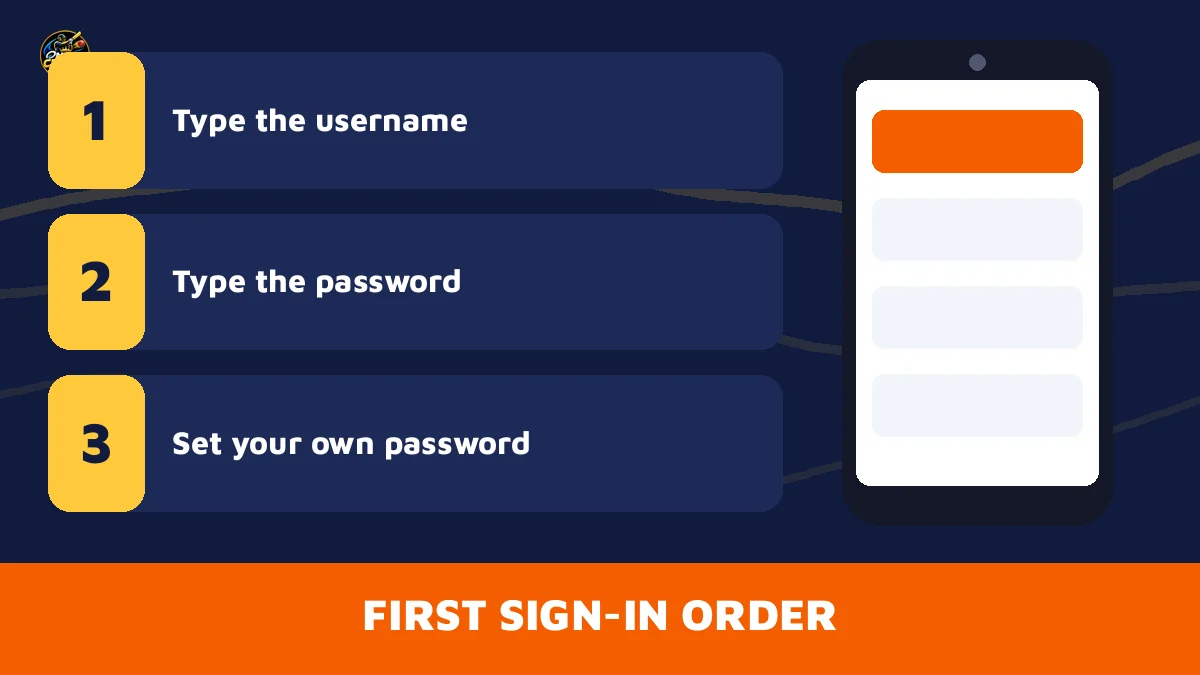
For every Online Cricket ID account, the order of a first sign-in is the same.
Cricket ID Login Questions Answered by the Trusted Desk
How do I find my cricket ID login details?
Use the chat search. Type the exchange name, Sky Exchange or Lotus365 for example, into the search of your Online Cricket ID thread and the message holding your username and starter password comes up, since both were sent there. Nothing turns up, or you deleted it? Ask the desk to resend both details.
Can I use one cricket ID login on two different exchanges?
No, a username opens a single exchange. A FairPlay login typed on Lotus365 returns user not found. To play on both, ask Online Cricket ID for a second ID; each one starts from ₹100 and keeps its own balance, so money never moves between the two.
Is the Online Cricket ID login free?
Yes. The ID costs nothing, with no joining fee and no monthly fee. You only deposit money you plan to play with, from ₹100, and deposits and withdrawals carry a fee of ₹0. A demo login is available on every exchange before you pay anything.
Will my cricket ID login change on the laptop if I reset it on my phone?
Yes, because there is only one account. Change the password on your phone and the laptop expects that new one the next time you sign in, so retype it there and update any saved browser entry. Every exchange on the Online Cricket ID rack opens in Android, iPhone and laptop browsers.
What if someone asks for my OTP during a cricket ID login reset?
Do not share it, because a cricket ID login never needs one. The exchange sign-in screen asks for your username and password and nothing more, and an Online Cricket ID reset only sends a new password into your own WhatsApp thread. A message asking for an OTP, PIN or card number is not from the desk.
Popular Cricket ID Login Searches on the Official Desk
- cricket id login
- online cricket id login
- online cricket id login password reset
- cricket id password bhul gaya
- cricket id login kaise kare
- cricket id username kahan dale
- online cricket id login not working
- online cricket id new address
- cricket id login mobile
- online cricket id change password
- online cricket id login whatsapp