
Cricket Betting App — Open Your Exchange Login Free on Android or iPhone and Bet from ₹100
Searching the Play Store will not turn up the cricket betting app you want, because it runs on an exchange's own web address instead. One WhatsApp chat at Online Cricket ID, open 24x7 since 2022, sends the login and that address. Pin the page through the Chrome menu or the Safari Share sheet. Online Cricket ID asks nothing for the username.

Is There a Cricket Betting App to Install? The Fast, Free Answer from Online Cricket ID
Your phone ends up with an icon, and behind it sits the live exchange website, with no installed program involved. That holds on every one of the fifteen exchanges Online Cricket ID covers: Chrome or Safari opens the address from your chat, the username signs you in, and the page gets pinned.
Try typing FairPlay or Lotus365 into the Play Store. What comes back is a score app, or a copy nobody at the desk ever sent, since Google Play in India keeps real-money betting off its shelves. That single rule is why all fifteen exchanges on the Online Cricket ID rack run through the browser, with a shortcut doing an install's job.
Short version. The app is the website.
Login first, address second. Step one follows the six-stage routine on the get cricket id request page, which runs from the first WhatsApp message to your new password and is free, as the Online Cricket ID costs nothing to issue. Step two happens on the phone itself and is only a few taps: Android just below, iPhone in the section after that one.
Cricket Betting App on Android: Easy Home-Screen Shortcut in Chrome
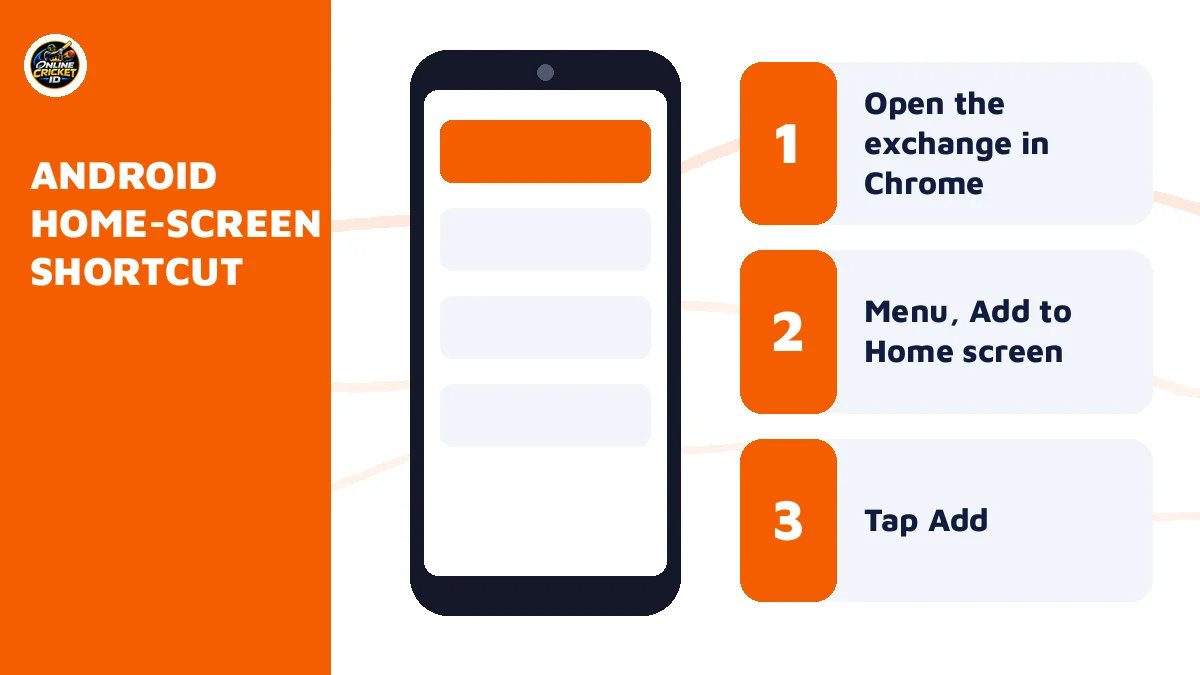
Chrome is where the Android icon gets made. Load the address from your Online Cricket ID chat, open the three-dot menu, choose Add to Home screen, then press Add; the exchange now has a tile among your apps, and one tap brings up its sign-in page.
- Scroll the Online Cricket ID chat to the most recent address message (older ones may be blocked by now) and get that link into Chrome, by tapping it or by copying it into the Chrome address bar.
- Let the exchange page load fully before doing anything else.
- Tap the three dots in the top corner of Chrome.
- Choose Add to Home screen from the list.
- Edit the name if you want something shorter, then tap Add.
- Back on the home screen, the exchange now has its own tile; the first press brings up the sign-in screen for the username from your chat.
That is the whole process. Six taps, give or take.
Because the icon points at the live site, it updates itself whenever the exchange changes its screens, and it takes no storage worth counting, which matters on a phone already packed with match photos and old WhatsApp videos you keep meaning to clear out one weekend. One catch. The icon remembers the address it was made from, so if that address gets blocked the icon goes dead with it, and you make a fresh one from the new link Online Cricket ID sends (section ten covers exactly that).
Make the shortcut from the address Online Cricket ID sent, never from a search result for the exchange name.
Safari Share Sheet Steps: Easy Cricket Betting App Icon for Online Cricket ID on iPhone
Safari is the browser for this job on iOS. Paste the address from the Online Cricket ID chat into it, press Share, find Add to Home Screen in the action list (it can sit under Edit Actions), and confirm with Add; the icon drops into the first free spot on your home screens.
- Copy the exchange address from the Online Cricket ID chat and paste it into Safari; if a tapped link opens inside WhatsApp instead, use the option to open it in Safari.
- Wait for the page to finish loading.
- Tap the Share icon, the square with an arrow pointing up.
- Scroll down the sheet and choose Add to Home Screen.
- Keep or change the name, then tap Add.
- Action missing from the Share sheet
- Scroll the lower list of actions to the end; on some iOS versions it hides under Edit Actions and has to be switched on once.
- Icon opens a blank page
- The address behind it has probably changed. Ask Online Cricket ID for the current one and make a new icon from it.
- Chrome on iPhone
- Switch to Safari before you save the icon, since that is where the home-screen action works reliably.
Work phone on Android, home phone an iPhone? One username covers both, and the balance matches on each screen since the two icons lead into a single exchange account. A laptop takes the same Online Cricket ID too: put the address into any browser you like and save it as a bookmark for later.
Two icons, two exchanges? Fine, as long as there are two logins behind them, because a FairPlay username will not open Sky Exchange, and the Online Cricket ID desk isues a second ID with a fresh ₹100 start and its own balance for anyone who wants both pinned next to each other on one phone.
Cricket Betting App Download APK: When a Trusted File Comes from Online Cricket ID
It depends on the exchange you picked, since only some build an Android file. Send the question in your Online Cricket ID chat: where a cricket betting app download apk exists, the desk posts the latest copy into that thread. Where none exists, the Chrome icon you just made is the app.
Most people never need the file. In practice the Chrome shortcut already reaches everything the login covers, the markets, the wallet and the casino tab, so an APK comes down to taste: some punters simply like an icon that does not open inside a browser.
- Start by naming your exchange in the chat, because the answer may well be no file.
- Install only the file Online Cricket ID sends in your own chat thread.
- Ignore APK links from Telegram groups, comment sections, random sites or any number other than the one you saved for the desk.
- Android will ask you to allow installs from that source; switch the setting back off once the install is done.
- When an exchange changes its file, ask again instead of reusing an old download.
A message lands at 11 pm: does my exchange have an app? The reply from Online Cricket ID is short. No file for that one right now, here is the address, add it to your home screen, same login.
Sizes and version numbers are something Online Cricket ID does not publish, because exchanges replace their files without notice; the file in your chat is the current one at the moment it was sent, and a fresh request is the only way to be sure it still is when you reinstall months later on a new phone.
Cricket Betting App Day-One Sign-In: Paste the Username, Then Set a Secure Password
Tap the new icon and the exchange wants a username and a password, both copied from the message Online Cricket ID sent after your deposit. Paste, sign in, and before the first bet swap the starter password for one you choose. A demo-login option sits beside sign in on some exchanges.
- Username
- The ID itself, typed exactly as sent, with no space before or after it.
- Password
- Case-sensitive. Capital letters matter.
- Demo login
- Only some exchanges have it. Same screens, practice balance, handy for a first look.
- New password
- Chosen by you on the first visit and kept to yourself.
Two fields. Then you are in.
About 2 minutes after your deposit clears, the login message lands. Copy from it; do not retype. Three slips cause most first-time failures on these logins: a stray space ahead of the ID, capitals in the wrong places in the password, and a bookmark made from an address that has since been blocked. Online Cricket ID keeps its full list of fixes on the cricket id login error page, and a reset takes minutes while the username stays the same.
No password prompt on your exchange? Change it yourself in the account menu before staking anything.
Unsure the app suits your phone? Ask Online Cricket ID for the demo login first and add the icon with that; if the screen feels cramped, switch exchange before a rupee moves.
Funding the Cricket Betting App From ₹100: Easy, Fee-Free Payments via Online Cricket ID
You will find no payment page inside the exchange icon. Funding happens one step to the side, in the Online Cricket ID WhatsApp chat: the desk names an account, you pay it ₹100 or more from a UPI app, IMPS, NEFT or a wallet, and the amount appears on the exchange balance. Fees are ₹0.
| Method | Minimum | Fee | Paid to |
|---|---|---|---|
| UPI, any UPI app | ₹100 | ₹0 | The account sent in your chat |
| IMPS bank transfer | ₹100 | ₹0 | The account sent in your chat |
| NEFT bank transfer | ₹100 | ₹0 | The account sent in your chat |
| Wallet | ₹100 | ₹0 | The account sent in your chat |
Here is how a ₹100 evening starts. 9:10 pm: a UPI transfer to the account in the Online Cricket ID thread. Around 9:12 pm, once it clears, the username and password arrive. Tap the home-screen icon, sign in, and that ₹100 sits on the balance for the match.
Pay the account typed in your own thread and nothing else; an OTP, PIN or card request is a warning sign.
Bigger first deposits change one thing. A first deposit of ₹5,000 carries the only bonus on offer, 5% extra, which comes to ₹250, and there is nothing else to claim, no cashback and no wagering story; the bonus maths for other amounts is set out on our home page. Each exchange needs its own start, since balances do not move between exchanges, so a second exchange means a second Online Cricket ID login and another ₹100.
Cricket Betting App Withdrawals: Online Cricket ID Sends Winnings Fast, in 5 to 15 Minutes
The icon shows your winnings; the chat moves them. Tell Online Cricket ID the amount, ₹100 at the least, and where it should go, and the money lands in that UPI ID or bank account somewhere between 5 and 15 minutes later, day or night, with nothing deducted on the way out.
- Check the balance on the exchange from your home-screen icon.
- Message the Online Cricket ID thread with the amount you want out, ₹100 or more.
- Give the UPI ID or bank account that should receive it.
- Allow 5 to 15 minutes for it to land.
- Confirm the exchange balance has dropped by the same amount.
Worked through: a ₹100 start, a good evening, ₹1,200 asked out through Online Cricket ID. It reaches UPI within 5 to 15 minutes and the fee is ₹0, so ₹1,200 is what arrives. 2 am or 2 pm, the window does not change.
Same window, any hour.
Nothing about the app itself speeds this up or slows it down, which surprises people who expect a separate app to pay faster than a browser tab; the payout runs through Online Cricket ID either way, and the timing stays at 5 to 15 minues whether you bet from an APK, a Chrome shortcut or a laptop.
Live Cricket Betting App Screen: What Online Cricket ID Logins Open First
On a phone, one fixture means one scrolling page. Top: match odds. Then the bookmaker market, then session (fancy) lines. That order holds on each exchange an Online Cricket ID login opens, prices tick over ball by ball, and tapping a price brings up the bet slip.
| What you see on a T20 night | What a thumb does with it |
|---|---|
| Match odds, back ₹500 at 1.80 | Bet slip shows a ₹900 return, ₹400 of it profit, before you confirm |
| Bookmaker quoted 45 to 47 per 100 | Same slip, a different market, with no commission taken |
| Session line, 6 over runs 48 to 49 | Pick NO or YES; it settles when the sixth over ends |
| Back ₹1,000 at 2.10, price now 2.00 | Lay ₹1,050 to book roughly ₹50 whichever way the match goes |
What each side means, and how YES and NO work on a session line, is spelt out on the cricket betting id markets page; here the point is where things sit on a small screen.
Brief pauses are normal. When a wicket falls or a boundary goes, markets on every exchange an Online Cricket ID login reaches suspend for a moent and the bet slip will not take a stake until prices return, which on a phone can feel as if the cricket betting app has frozen when the exchange is only repricing after the ball. Give it a few seconds.
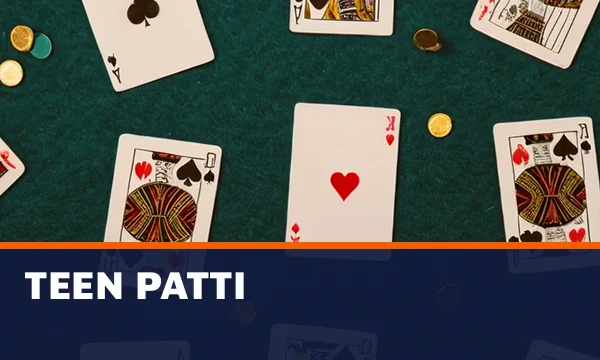
Session lines pile up in IPL weeks, often settling at 6, 10, 15 and 20 overs; that season detail has its own home on the cricket betting app ipl markets page. Football, tennis and kabaddi sit on the same Online Cricket ID login, and so does a casino tab where teen patti, andar bahar, dragon tiger and roulette share one balance (see the online casino id lobby page for that side). Some of those screens appear below.



Easy cricket betting app demo: chase 10 in six balls
Tap once per ball. The round is a demo with no real money, and it stops when the target falls, a wicket comes or the over is done.
Best Cricket Betting App by Punter Type: Online Cricket ID Exchange Comparison
Pick the exchange whose phone screen matches your habit, because the markets themselves overlap heavily. All fifteen Online Cricket ID can open give you back and lay cricket, session lines, in-play and a casino lobby. Layout is the real difference: busy or plain, sportsbook-like or a classic two-sided ladder.
| Exchange | Screen style | Strongest on | Suits |
|---|---|---|---|
| FairPlay | Sportsbook-style layout with exchange markets alongside | Premium cricket and fancy, live cards | Someone coming from a sportsbook who still wants back and lay |
| Sky Exchange | Classic exchange layout, back and lay side by side | Match odds, bookmaker and fancy tabs | Punters who like the traditional two-sided ladder |
| Lotus365 | Busy lobby with a large session menu | Big fancy menu on IPL, busy live casino | IPL session players who also play cards |
| Diamond Exchange | Plain odds grid many agents use | Match odds, bookmaker, session | Anyone who wants a grid with nothing extra |
| The other eleven on the rack | Exchange layouts | Back and lay, session, in-play, casino and crash games | Punters who already know and trust one name |
Money rules stay put. Swapping a Lotus365 icon for a Diamond Exchange one on your home screen leaves the Online Cricket ID numbers untouched, so the ₹100 floors, the ₹0 charges and the payout clock carry across.
Can't decide? Try the demos first, since Online Cricket ID gives you a demo login on every exchange, and ten minutes spent on two of them tells you more about which screen suits your thumb than any table can, especially on a smaller phone where a crowded session menu is harder to scroll than it is on a laptop.
Blocked Cricket Betting App Link: Quick Recovery Through Online Cricket ID, Balance Intact
A blank page or error on an icon that worked yesterday usually means a blocked address, since Indian betting domains get blocked now and then. The fix is one message to Online Cricket ID, which replies with the working link, and your old username and balance open there unchanged.
- Try the icon once on mobile data and once on Wi-Fi, to rule out a weak signal.
- Nothing on either connection? Ask Online Cricket ID in the chat for today's address.
- Open the new link in Chrome or Safari and sign in with your existing username and password.
- Delete the old home-screen icon.
- Make a new shortcut from the new address, using the Android or iPhone steps above.
Nobody starts over. The account is held by the exchange, and a block only takes away the web address in front front of it, so Online Cricket ID sends the working one and the same ID opens the same balance there, down to the last rupee, on your next sign-in.
On data use, a quick word. The odds screen is light, and following a live match on 4G mobile data works. If the screen loads but prices stop updating, the cause is more likely signal than a block (hard to say from a distance, so ask the desk if unsure). Old bookmarks hit the same dead end as old icons, so clear those out too whenever Online Cricket ID sends a fresh address.
Can You Use a Cricket Betting App in India? Official Act Wording, Free Login and 18+ at Online Cricket ID
An icon on the home screen does not change your legal position, and nor does an APK. Under the Promotion and Regulation of Online Gaming Act, 2025, online money gaming is restricted; rules differ and have tightened, so read the law for your state and play only if you are 18+ and it is allowed where you live.
Anyone asking whether a cricket betting app is legal anywhere in India gets the Act wording above and nothing softer. Free has a second meaning in app searches too, because plenty of people type online cricket betting app free hoping for a no-deposit bonus, and there is none: the free part is the Online Cricket ID login and the demo, while real-money bets start at ₹100. Since 2022 Online Cricket ID has run on that model, with one WhatsApp thread open 24x7 for the ID, deposits, payouts and resets.
18+ only. The thread you deposit through is also where Online Cricket ID switches on a deposit ceiling or a cool-off lock, on request.
Cricket Betting App Questions: Quick Answers from Online Cricket ID
Which cricket betting app is safe to use?
The safer pick is whichever exchange address or APK arrives in your own Online Cricket ID chat. Copycat sites borrow exchange names and screens, and an IP-masking app on top changes none of that, so a link pulled from search results or a group chat is where the risk sits for most phone users.
Is there a free cricket betting app?
Yes in one sense: the icon and the username cost nothing, and practice money comes through a demo login. Staking real rupees is different, since that starts at ₹100 paid through Online Cricket ID. Searchers hoping for a no-deposit credit will not find one; the only extra is 5% on a ₹5,000 first deposit.
Can I use one cricket betting app ID on two phones?
Yes, and a laptop too. Your Online Cricket ID username works in Chrome on Android, Safari on iPhone and any laptop browser, with one balance across all of them since it is a single exchange account. A different exchange is the exception: that needs its own ID and a fresh ₹100 start.
How do I download the cricket betting app on Android?
Through Chrome, with no download in most cases: load the exchange address Online Cricket ID gave you, open the browser menu and pick Add to Home screen. Some exchanges also publish an APK of their own; ask in the WhatsApp thread and the desk sends the current file there.
Why did my cricket betting app stop working?
Usually the exchange address was blocked while your home-screen icon still points at the old one. Ask Online Cricket ID for the working address, sign in there with the same username and password, then build the shortcut again from the new link. Your balance carries over untouched and the ID stays yours.
Which app is good for cricket betting in India?
Try two demos and keep the one that sits well under your thumb, because Online Cricket ID terms are identical across all fifteen exchanges. As a starting point, FairPlay feels closest to a sportsbook, Sky Exchange keeps the two-sided ladder, Diamond Exchange stays a plain grid and Lotus365 carries a long IPL fancy menu.
Quick Cricket Betting App Searches Online Cricket ID Covers
- online cricket betting app
- best cricket betting app in india
- cricket betting app download
- cricket betting app real money
- cricket betting app online
- live cricket betting app
- cricket id app
- cricket betting app download apk
- cricket betting app with minimum deposit 100
- best cricket betting app